

AI Browser:- Technology is evolving faster than ever, and artificial intelligence is changing almost everything around us. From smartphones to banking apps, AI is now becoming a part of our everyday digital life.
One of the newest innovations in this field is the AI Browser.
In 2026, more people are moving from traditional browsers to AI-powered browsers because they offer smarter search, better productivity, and faster results.
But what exactly is an AI browser?
How does it work?
And is it better than Google Chrome?
In this complete beginner guide, we will explain everything in simple words.
By the end of this article, you will understand:
✔ What an AI browser is
✔ How AI browsers work
✔ Their main features
✔ Their advantages and disadvantages
✔ Best AI browsers in 2026
✔ Whether they are safe to use
Let’s begin.

🌐 What Is an AI Browser?
An AI Browser is a web browser that uses artificial intelligence to improve your browsing experience.
Unlike traditional browsers, AI browsers can understand your behavior, learn your habits, and provide smarter suggestions.
This means:
- Faster search results
- Instant summaries
- Better tab management
- Writing assistance
- Automated browsing tasks
Think of an AI browser like a smart assistant built inside your browser.
For example:
Instead of reading a 3000-word article, the AI browser can summarize it in seconds.
Instead of searching multiple websites, it can collect and organize the information for you.
That’s what makes AI browsers different.
⚙️ How Does an AI Browser Work?
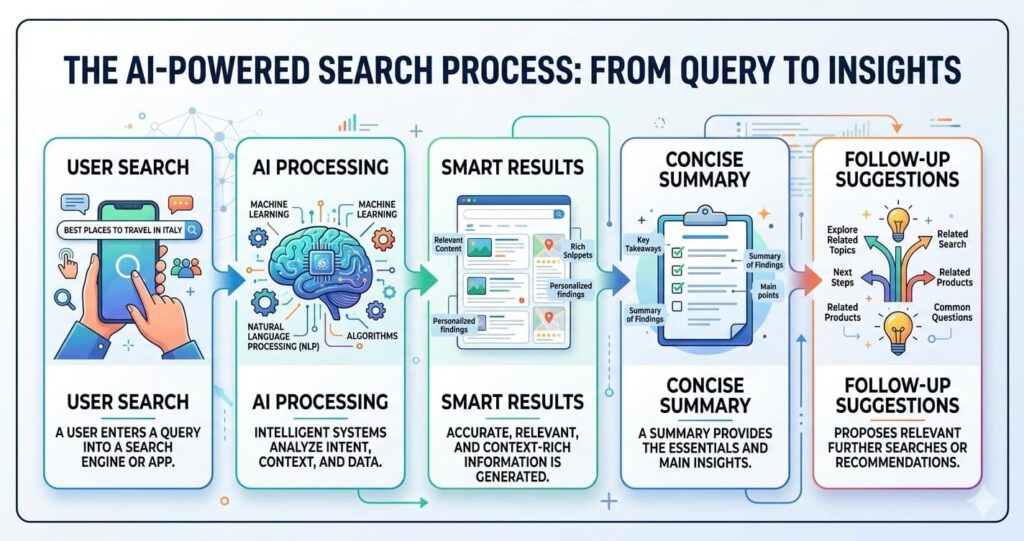
AI browsers combine multiple technologies:
- Machine Learning (ML)
- Natural Language Processing (NLP)
- Predictive Analytics
- Behavioral Learning
- Automation
These technologies work together to make browsing smarter.
🔍 Smart Search Understanding
Traditional browsers mostly depend on keywords.
AI browsers understand the intent behind your search.
Example:
If you type:
“Best laptop for video editing”
The AI browser understands you need recommendations, comparisons, and reviews.
This makes results more relevant.
📄 Instant Summarization
One of the biggest features is content summarization.
AI can scan:
- Blog posts
- Research papers
- News articles
- PDFs
and provide short summaries.
This is useful for students and researchers.
🎯 Personalized Browsing
AI learns from your browsing habits.
It studies:
- What websites you visit
- What you search
- What content you read
Based on this, it suggests better content.
This improves browsing speed.
🤖 Task Automation
Some AI browsers can automate repetitive tasks like:
- Filling forms
- Managing tabs
- Writing emails
- Scheduling meetings
- Organizing bookmarks
This saves time.
🚀 Main Features of AI Browsers
AI browsers are packed with powerful features.
Let’s look at them.
💬 Built-in AI Assistant
Many AI browsers have an AI chatbot inside them.
It can:
- Answer questions
- Explain content
- Translate languages
- Help in writing
This reduces the need to switch tabs.
✍️ Writing Support
Writers and bloggers can use AI browsers for:
- Grammar correction
- Sentence rewriting
- SEO suggestions
- Content ideas
This is very useful for content creators.
📑 Smart Tab Management
If you open many tabs, AI organizes them automatically.
This helps improve focus.
🔐 Security Alerts
Some AI browsers detect suspicious websites and warn users.
This improves cybersecurity.
🎤 Voice Commands
Users can search using voice.
This makes browsing easier and faster.
📊 AI Browser vs Traditional Browser
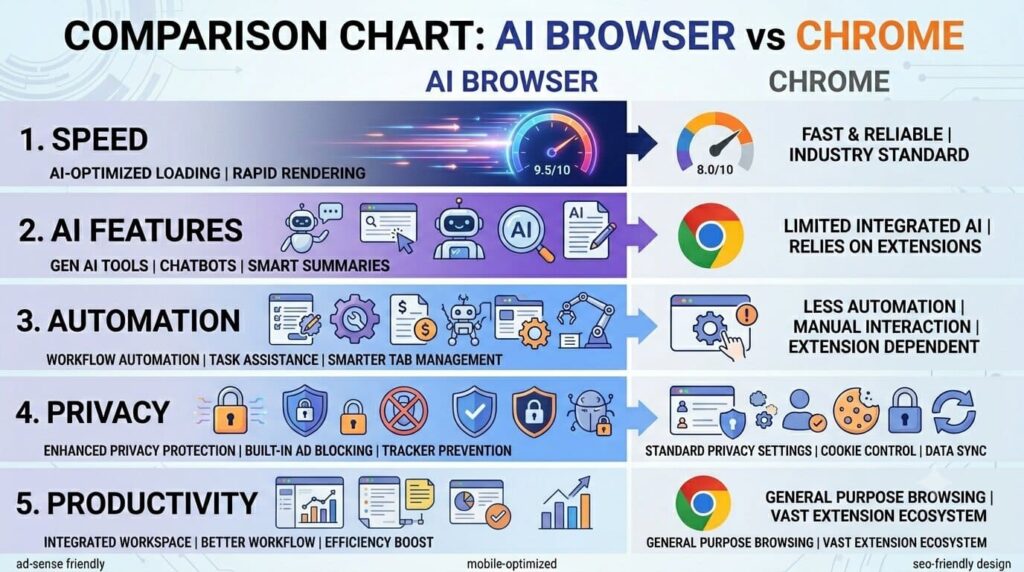
Traditional browsers are powerful, but AI browsers are smarter.
Here’s the difference:
Speed:
Traditional browsers are fast.
Intelligence:
AI browsers are smarter.
Productivity:
AI browsers save more time.
Automation:
Traditional browsers have limited automation.
Research:
AI browsers are better.
For simple browsing, Chrome is enough.
For smart productivity, AI Browser wins.
🏆 Best AI Browsers in 2026
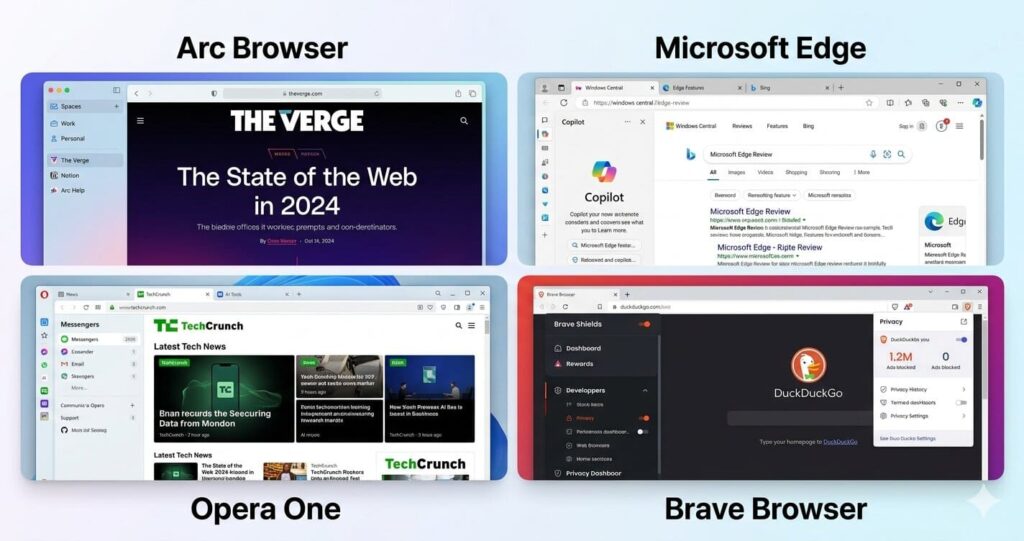
Here are some popular AI browsers.
Arc Browser
Arc Browser is one of the fastest-growing AI browsers. It focuses on productivity and smart tab organization.
Best for:
Students and professionals.
Opera One
Opera One comes with built-in AI tools for writing and summarization.
It is beginner-friendly.
Best for:
Casual users.
Microsoft Edge Copilot
Microsoft Edge now includes AI-powered Copilot.
It helps with:
- Search
- Writing
- Summaries
- Research
Best for:
Office users.
Brave Browser AI
Brave combines privacy and AI.
It is good for users who care about security.
Best for:
Privacy-focused users.
✅ Benefits of Using an AI Browser
There are many benefits.
Saves Time ⏳
Summaries and automation reduce time.
Improves Productivity 📈
AI tools make work faster.
This is useful for bloggers, students, and professionals.
Better Research 📚
AI browsers collect information faster.
Perfect for learning.
Better Organization 📂
Tabs, bookmarks, and tasks stay organized.
Personalized Experience 🎯
The browser adapts to your needs.
⚠️ Are AI Browsers Safe?
AI browsers can be safe, but users must check:
- Privacy policy
- Data usage
- Permissions
- Security standards
Some browsers collect user data.
Always read their privacy terms.
For users doing financial transactions, privacy matters a lot.
🔮 Future of AI Browsers
The future looks powerful.
Experts believe AI browsers will soon:
- Replace traditional search
- Understand human emotions
- Automate full workflows
- Improve online shopping
- Help in education
In the next few years, AI browsing may become the new normal.
Just like smartphones changed communication, AI browsers may change the internet.
❓ Frequently Asked Questions
Is AI Browser free?
Many AI browsers offer free versions.
Some advanced features may require payment.
Which AI browser is best?
Arc and Edge Copilot are strong options.
Can AI Browser replace Chrome?
Not completely yet, but they are improving fast.
Is AI Browser safe for banking?
Use trusted browsers with strong privacy.
🧠 Final Thoughts
AI browsers are one of the most exciting tech trends in 2026.
They are faster, smarter, and more productive than traditional browsers.
Whether you are a student, blogger, researcher, or professional, AI browsers can improve your online experience.
The internet is becoming more intelligent, and AI browsers are leading that change.
If you haven’t tried one yet, this is the best time to explore.
1 thought on “What Is AI Browser and How Does It Work? (Complete Beginner Guide 2026)”