

In today’s digital world, sharing photos online has become part of our everyday lives. Whether you’re uploading images to Instagram, Facebook, LinkedIn, your personal blog, an online marketplace, or a business website, every photo may contain more than what appears on the screen.
Most people focus on the visual quality of an image, but very few realize that image files often store hidden information known as metadata. With the rapid rise of AI-powered photo editing and image generation tools in 2026, another layer of hidden information—AI metadata—has become increasingly common.
AI metadata may contain technical details about how a photo was created or edited. Although this data is typically used for workflow management or program compatibility, there are some circumstances in which you might want to delete it before making your photos public. Doing so can help protect your privacy, reduce unnecessary file information, and keep your content looking more professional.
If you regularly publish photos on your website, social media accounts, or share images with clients, understanding AI metadata is an important part of maintaining good digital privacy practices.
If you want to improve your overall online privacy, you might also like our guide on the Best Privacy Browser Extensions for Chrome in 2026:
🤖 What Is AI Metadata?
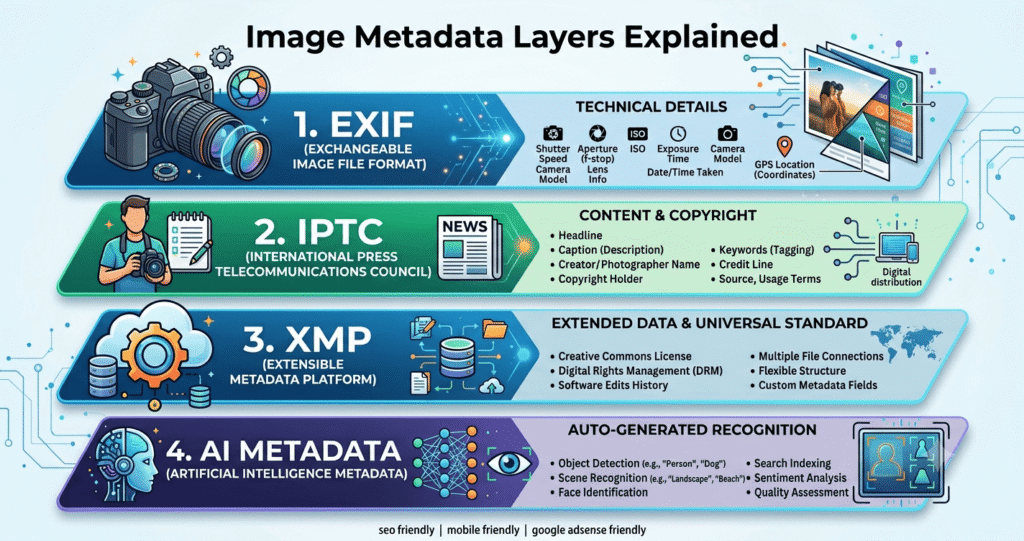
AI metadata refers to hidden information stored inside an image file that describes how the image was created, edited, processed, or exported using artificial intelligence software or other image editing tools.
Unlike captions, watermarks, or visible text, metadata remains invisible during normal viewing. It is incorporated in the image file and is frequently viewable using the operating system’s file properties or metadata inspection tools.
Modern AI image generators and photo editing software may include technical information such as:
- AI software name
- Editing application
- Export settings
- Image dimensions
- File format
- Creation date
- Color profile
- Processing history
- Copyright details
- Device information (when applicable)
It’s important to understand that not every AI tool stores the same type of metadata. The amount and type of information vary depending on the software and export settings used.
To learn more about digital content authenticity standards, visit the official C2PA website:
❓ Why AI Metadata Matters

Many people assume that a photo only contains visual information. In reality, the file itself may include hidden technical data that provides additional context about the image.
For casual users, this information is often harmless. However, for professionals, businesses, photographers, bloggers, journalists, and content creators, reviewing metadata before sharing images is considered a good privacy practice.
Removing unnecessary AI metadata can help you:
🔐 Protect Your Privacy
Some images may include location details, software information, or device-related metadata that you don’t want to share publicly.
📁 Keep Files Clean
Removing unnecessary metadata reduces clutter and leaves only the essential image information.
💼 Present Professional Work
Clients often appreciate receiving clean image files without unnecessary editing history or software details.
🌐 Improve Website Management
If you run a website, optimized image files can simplify your media library and make content management easier.
🛡️ Reduce Unnecessary Information Sharing
While metadata is usually harmless, limiting the amount of hidden information you publish online gives you better control over your digital footprint.
If you also want to improve your website’s security, don’t miss our article:
Read Also:- How to Secure Home WiFi from Hackers
📂 Types of Metadata Found in Images
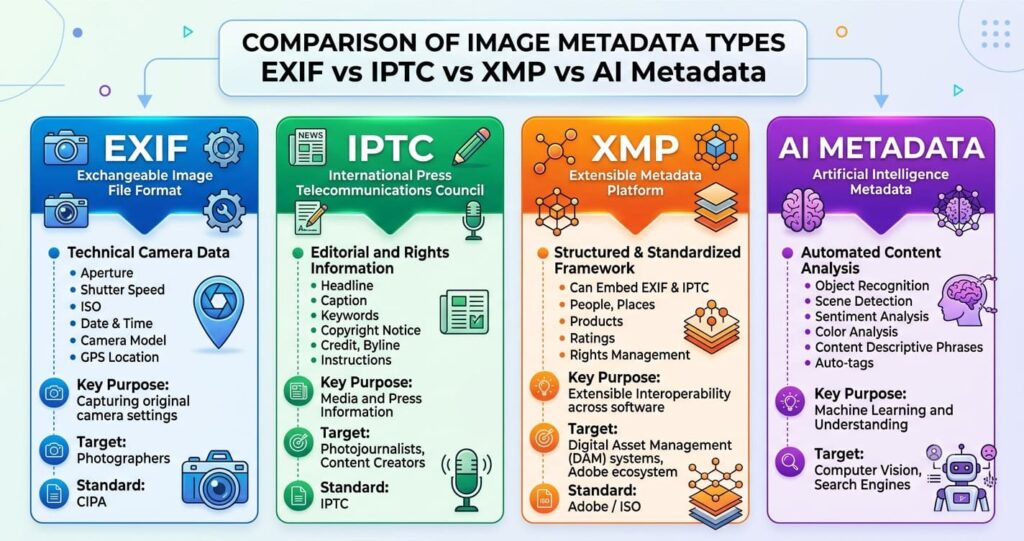
Not all metadata is related to AI. Image files can contain several different categories of hidden information.
Understanding these categories helps you decide what should be removed before sharing your photos online.
📷 1. EXIF Metadata
The most popular kind of image metadata is called EXIF (Exchangeable Image File Format).
It is automatically generated by cameras and smartphones.
Typical EXIF information includes:
- Camera model
- Lens type
- ISO settings
- Exposure
- Aperture
- Flash settings
- GPS location (if enabled)
- Date and time
- Orientation
This information is particularly useful for photographers but may reveal more than intended when shared publicly.
📝 2. IPTC Metadata
IPTC metadata is widely used by media organizations, photographers, and publishers.
It may include:
- Author name
- Copyright information
- Description
- Keywords
- Contact information
- Usage rights
This type of metadata is useful for organizing and licensing images.
⚙️ 3. XMP Metadata
XMP (Extensible Metadata Platform) is commonly added by professional editing software.
It may store:
- Editing history
- Export settings
- Software version
- Color profile
- Processing workflow
Many professional photo editing applications use XMP to maintain compatibility across creative software.
🤖 4. AI Metadata
AI-generated or AI-edited images may include additional technical information depending on the application used.
Possible examples include:
- AI model information
- Generation method
- Processing details
- Export configuration
- Editing workflow
- Software version
The exact contents differ from one application to another.
⚠️ Risks of Sharing Photos with AI Metadata
Although metadata is generally harmless, there are situations where sharing it may not be ideal.
Here are some common concerns.
📍 1. Location Privacy
If GPS information is embedded in your photo, someone may be able to determine where the image was taken.
💻 2. Software Disclosure
Metadata can reveal which editing software or AI application was used to process the image.
📅 3. Timeline Information
Creation dates and editing timestamps may disclose your workflow or project timeline.
📷 4. Device Information
Original photos may contain details about your smartphone or camera model.
📂 5. Unnecessary Technical Data
Many websites and clients don’t require this information, making it unnecessary to include when sharing images.
🔍 How to Check AI Metadata Before Sharing
Before removing metadata, it’s helpful to inspect what’s already stored inside your image.
You can check metadata using:
- Built-in file properties in Windows
- Finder information on macOS
- Photo details on Android
- Photo information on iPhone
- Trusted metadata viewer applications
Reviewing metadata before uploading images allows you to make informed decisions about what information you want to keep or remove.
Adobe also provides helpful information about metadata and digital assets:
🛡️ Best Ways to Remove AI Metadata from Photos
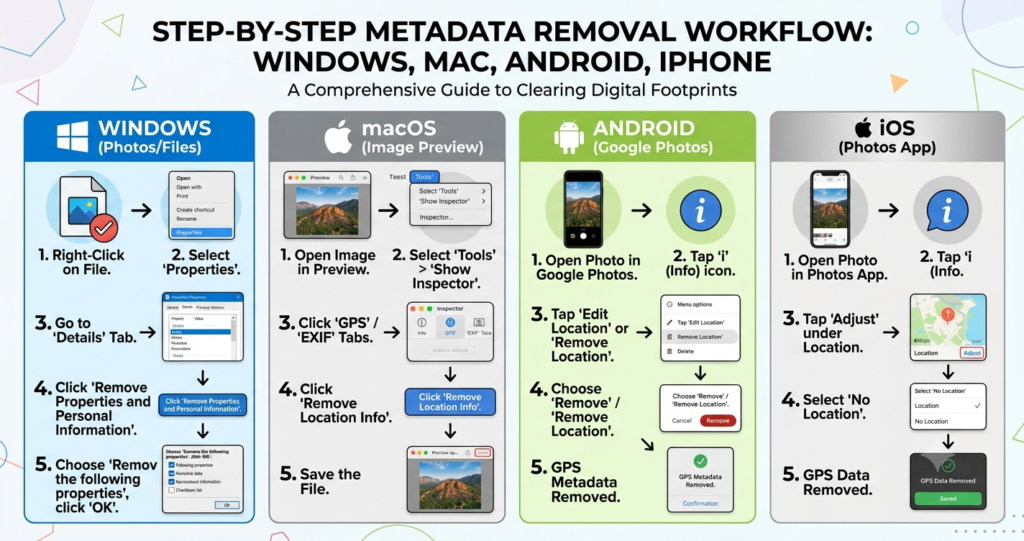
Now that you understand what AI metadata is and why it matters, let’s explore the safest methods to remove it before sharing your images online.
The good news is that you don’t need advanced technical knowledge. Most operating systems already include built-in tools for removing personal metadata, while several trusted applications provide additional control.
💻 Method 1: Remove AI Metadata on Windows
Windows includes a built-in feature that allows you to remove personal metadata from image files without installing third-party software.
Steps:
- Locate the photo on your computer.
- Right-click the image.
- Select Properties.
- Open the Details tab.
- Click Remove Properties and Personal Information.
- Select a “Create a copy with all possible properties removed.”
- Save the cleaned version.
This method removes many personal properties while preserving the image quality.
👉 Official Microsoft Guide:- microsoft.com
🍎 Method 2: Remove AI Metadata on macOS
Mac users can remove unnecessary metadata using built-in tools or by exporting images through editing applications.
Common options include:
- Exporting edited copies
- Removing location information
- Using Preview for basic image management
- Using professional photo editing software with metadata controls
You can decide whether or not metadata should be included during export in many creative programs.
👉 Official Apple Support:- apple.com
📱 Method 3: Remove AI Metadata on Android
Android devices have improved privacy controls in recent years.
Depending on your phone model, you can reduce or remove metadata before sharing photos.
Popular methods include:
- Removing location information before sharing
- Exporting edited copies
- Using trusted metadata removal apps
- Sharing optimized versions instead of originals
Always download apps only from trusted sources and review permissions carefully.
If you’re interested in improving your overall digital security, you may also enjoy reading:
Read Also:- How to Secure Home WiFi from Hackers
📲 Method 4: Remove AI Metadata on iPhone
Apple provides several privacy-focused features that help users control shared information.
Before sending a photo, you can remove location data and share a cleaner version of the image.
Best practices include:
- Remove GPS location before sharing
- Export edited copies
- Review sharing settings
- Keep iOS updated
Apple continues to improve photo privacy with each software update.
👉 Official Apple Privacy Information:- apple.com
🌐 Method 5: Use Trusted Metadata Removal Tools
If you frequently work with images, a dedicated metadata removal tool can simplify your workflow.
When choosing software, look for these features:
- Batch image processing
- EXIF removal
- IPTC removal
- XMP support
- Metadata preview
- Secure offline processing
- Regular updates
Avoid using unknown online tools for sensitive or confidential images.
📸 Does Taking a Screenshot Remove AI Metadata?
This is one of the most common questions asked by content creators.
The answer is partially.
Taking a screenshot usually creates a completely new image file. As a result, much of the original metadata may not be copied.
However, screenshots can still contain:
- Screenshot creation date
- Device information
- Screen resolution
- File creation details
Therefore, screenshots should not be considered a guaranteed privacy solution.
🚫 Common Mistakes to Avoid
Many users unintentionally expose information because they overlook simple privacy steps.
Here are some common mistakes:
❌ Assuming All Metadata Is Removed Automatically
Not every platform removes metadata during uploads.
❌ Sharing Original Camera Files
Original images often contain the most metadata.
Whenever possible, export optimized copies.
❌ Forgetting GPS Information
Location data is one of the most sensitive types of metadata.
Always disable or remove it before publishing.
❌ Installing Untrusted Metadata Apps
Only use well-known applications from trusted developers.
Unknown apps may introduce privacy or security risks.
❌ Deleting Original Photos
Keep an untouched backup of your original files.
If you ever need the original metadata for professional work, you’ll still have it available.
💡 Best Privacy Tips Before Sharing Photos Online

Protecting your privacy goes beyond simply removing metadata.
Follow these best practices:
- Review image properties before uploading.
- Remove unnecessary location information.
- Use strong passwords for cloud storage.
- Enable two-factor authentication.
- Keep your operating system updated.
- Review app permissions regularly.
- Share optimized image copies.
- Store original files securely.
- Regularly audit your online accounts.
If you’re looking for more privacy-focused tools, don’t miss our article:
Read Also:- Best Privacy Browser Extensions for Chrome in 2026
📈 Benefits of Removing AI Metadata
Cleaning image metadata provides several advantages.
🔒 Better Privacy
Hidden technical details remain private.
💼 Professional Image Delivery
Clients receive clean, polished image files.
📁 Better File Organization
Images contain only essential information.
🌍 Greater Control
You decide what information is shared publicly.
🚀 Improved Digital Hygiene
Developing privacy-conscious habits reduces the risk of accidental information disclosure.
❓ Frequently Asked Questions (FAQs)
Can AI metadata reveal my identity?
Not necessarily. It depends on what information is stored inside the image. Some files only contain technical details, while others may include location or device information.
Is removing metadata legal?
Yes. Removing metadata from your own photos is a common and legitimate privacy practice.
Will removing metadata reduce image quality?
No.
Metadata is separate from the image itself, so removing it does not affect visual quality.
Does every AI-generated image include metadata?
No.
Different AI tools use different metadata formats, and some may include very little information.
Should bloggers remove AI metadata?
Yes.
If you regularly publish images online, reviewing and removing unnecessary metadata can help protect your privacy and maintain a more professional workflow.
🎯 Final Thoughts

As artificial intelligence continues to transform digital photography and image editing, understanding AI metadata has become an essential part of responsible online sharing.
Although metadata serves useful technical purposes, it can also contain information that you may not want to make publicly available. Taking a few extra moments to inspect and remove unnecessary metadata before uploading your photos helps you maintain better control over your digital privacy.
Whether you’re a blogger, photographer, designer, freelancer, student, or business owner, adopting good metadata management habits is a simple yet effective way to protect your personal information while presenting professional-quality content.
Before publishing your next image, remember this simple checklist:
- Review the metadata.
- Remove unnecessary information.
- Keep a backup of the original file.
- Share only the optimized version.
- Stay informed about privacy features in your devices and software.
By making metadata review a regular part of your workflow, you’ll be better prepared to share photos safely, confidently, and professionally in 2026 and beyond.